


Samsung Browser
3.6189.37K Reviews
App Specs
- Version
- Varies with Device
- Updated On
- License
- Free
- Downloads
- 1,000,000,000+
- Developer
- Samsung Electronics Co., Ltd.
- Categories
- Communication
- Platform
- Android
Screenshots



 Analysis by AppCompare
When I choose a browser, I care less about a long feature checklist than about whether it feels comfortable during ordinary errands: checking a delivery page, comparing a few products, or opening a link someone sent me. Samsung Browser is a free communication app from Samsung Electronics Co., Ltd., and I find it most appealing when I want a straightforward mobile browsing experience without making a browser switch feel like a project. It is available to everyone, but the way it fits into your routine matters more than its broad reach.
What I expect from its speed
On a phone, “fast” is not just how quickly a page first appears. It also means that moving between a search result and the page I meant to open feels natural, and that returning to a tab does not turn a quick task into a wait. My impression of Samsung Browser is that its uncluttered approach helps routine browsing feel direct. I would not treat that as a promise that every site will load equally quickly: a heavy page, a weak connection, or a busy device can affect any mobile browser.
That distinction is useful when deciding whether a browser is right for you. If your daily browsing mostly involves articles, maps, shopping pages, and links from messages, a simple interface can make the whole process feel brisk even when the network is doing the hard work. If you regularly load large, complex sites, compare its behavior on the pages you actually use rather than assuming that a browser’s reputation guarantees the same result everywhere.
Where a busy browsing session can feel different
A handful of open tabs is a normal way to plan a day: one tab for a train timetable, another for a venue, and a third for a message with the address. The practical test is not whether a browser can keep tabs open in the abstract, but whether you can return to the right page without losing your place or feeling buried in clutter. Samsung Browser’s simple presentation suits this sort of short, task-based session better than a setup that makes tab management feel like a separate chore.
For heavier use, I would be more deliberate. Several media-rich pages, long sessions, and frequent switching can put pressure on a phone’s memory and battery regardless of which browser is installed. If the phone starts slowing down, closing pages you have finished with is a sensible first step; keeping every page open is convenient, but it is not always the best trade-off on a device with limited resources. I also avoid judging stability from one unusually demanding page, because a site itself can be the source of a problem.
Privacy tools need sensible expectations
Private browsing is handy when I do not want a particular session added to my ordinary browsing history, and the browser’s secret mode gives that use case a clear place. I see it as a way to keep local browsing separate, not as a guarantee of complete anonymity. A private window does not make every website trustworthy or remove the need to think carefully before entering personal details.
The anti-tracking option is another useful layer for people who would rather limit some tracking while browsing. It is still worth remembering that privacy controls involve trade-offs: a site can behave differently when certain content or tracking elements are restricted. If a page stops working as expected, checking the relevant browser setting or trying the page in a regular session can help identify whether the privacy choice is involved.
Worth Reading Before You Choose

Flipboard Shows What News Apps Must Do Beyond the Feed

Switching to Android Auto Means Rethinking Your Driving Routine

Google Calendar Makes a Crowded Week Easier to Manage

Ludo King Makes the Most of the Minutes Between Plans

Baby Panda World Brings Quick Play to Modern Phones, but Its Game Library Feels Busy

ESPN’s Live Game View Makes Following Close Games Easier
Useful ways to make it fit your routine
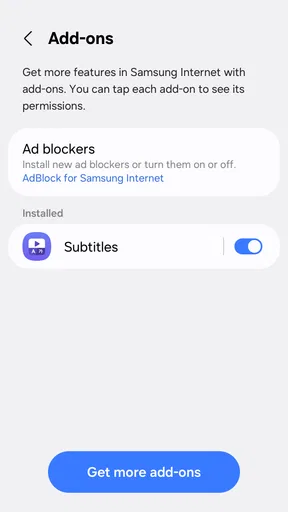
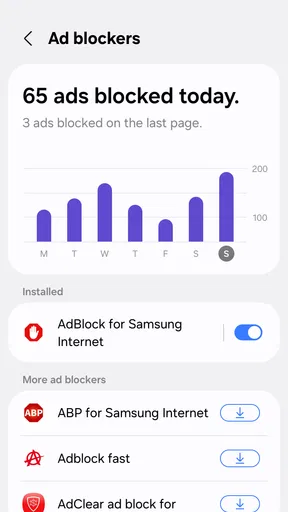
Extensions can be valuable when they solve a recurring problem, but I would add them selectively rather than treating every available extra as essential. An ad blocker, for example, may make some pages easier to read, while a password manager can reduce the hassle of signing in. Those tools also add choices to manage, so anyone who prefers a bare, predictable browser may be happier keeping the setup lean.
Bookmarks are most useful when they reflect real tasks rather than becoming a drawer of pages I meant to revisit. I like grouping or organizing saved pages around practical needs—regular services, research, or places I am planning to visit—so I can get back to them quickly. Customization is a bonus when it improves visibility or makes frequent actions easier to find; it matters less if you rarely change a browser after the first day.
Cross-device continuity is especially relevant if you use Samsung devices and want your saved pages or tabs available elsewhere in that environment. Before relying on it for an important handoff, I would check that the devices are set up as I expect and that the content I need is actually available. If you use a mixture of phones, tablets, and computers from different ecosystems, choosing a browser based on how well it carries your everyday setup across all of them may be more important than any one device-specific advantage.
Who should consider it—and who may prefer another browser
I would recommend giving it a look if you use an Android phone, value a clean interface, and want privacy options and customization without turning browsing into a hobby. It makes particular sense for someone already comfortable with Samsung’s ecosystem, or for a person who wants a dependable place to handle everyday links and searches. Samsung Browser has been available since August 24, 2015, and its scale is substantial: it has over one billion installs, with an average rating of 3.6 from around 5.9 million ratings. That popularity is useful context, but it does not tell you whether its controls and workflow will suit your habits.
A different browser may be a better choice if your first priority is matching an existing setup across a wide range of non-Samsung devices, or if you depend on a particular extension that is not available here. The same applies if you already have a browser whose bookmarks, passwords, and routines are working exactly as you need them: switching has a real setup cost. I would not change browsers just to chase a vague promise of speed; try the alternative on your normal sites and compare the parts of the experience you actually notice.
For a realistic example, imagine I am leaving work and need to check a restaurant’s opening information, send its address to a friend, and look up the route. I can open the relevant pages, save a useful result if I expect to need it again, and use a private session if I have a reason to keep that search out of my usual history. The value is not a dramatic feature moment; it is having the basic browsing steps close at hand without a confusing interface getting in the way.
Reliability and the limits of a clean experience
A browser can feel polished and still encounter a crash or a page that behaves oddly. Reports of occasional crashes are a reminder that reliability is not identical on every phone and website, even though I did not run into one during my own trial. If a page repeatedly fails, I would first reload it, check whether the connection is stable, and see whether the same issue happens in another browser before deciding the app itself is at fault.
Extensions and privacy settings can also complicate troubleshooting. When a site looks incomplete, temporarily checking it without an extension or in a different browsing mode can narrow down the cause. I would make one change at a time, rather than disabling everything at once, because that makes it easier to keep the features that are genuinely helping. The extension selection is not as broad as in some alternatives, so users who build their workflow around specialized add-ons should check that their essentials are covered before moving over.
Device constraints and everyday trade-offs
Samsung Browser is not a magic fix for an older or heavily loaded phone. If several apps are active and the device is short on memory, browser tabs may be one part of the pressure, but they are not necessarily the only cause. I find it more useful to keep a manageable number of active pages and close finished ones than to expect any browser to make an overburdened device feel new. On a device where every resource matters, a lightweight routine—fewer tabs and only necessary extensions—is a more realistic way to keep browsing comfortable.
That advice also answers a common practical question: should you keep it open as your only browser? If it handles your regular sites, your preferred privacy settings work as expected, and you can access the bookmarks or tabs you need, there is no need to keep switching just for the sake of it. If one site or work process consistently behaves better elsewhere, keeping another browser available for that specific job is a reasonable compromise rather than a failure of either app.
Samsung Browser is a communication app developed by Samsung Electronics Co., Ltd. Its large audience—about 189,000 written reviews alongside its many ratings—shows that it is a familiar choice for a lot of people, although I would give more weight to my own day-to-day fit than to the crowd’s verdict. Its free price removes a purchase decision, and its Everyone age rating makes it broadly suitable; neither point means every feature or workflow will be right for every user.
First Impressions: Sleek and User-Friendly
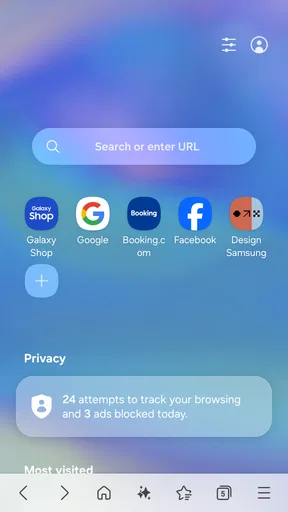
From the moment you launch the Samsung Browser, it feels intuitive. The interface is sleek, minimalistic, and it doesn’t bombard you with a million buttons. It’s like they’ve taken a leaf out of the book of simplicity, and I’m all here for it. Navigating through the app is straightforward, and even if you’re not a tech-savvy person, you’ll find your way around easily.
Speed and Performance
Let’s talk speed. I’m not one for waiting around, and thankfully, this browser doesn’t make you do that. Pages load swiftly, and the performance is consistently smooth. Even with multiple tabs open, I didn’t experience any noticeable lag. It’s like having a high-speed train in your pocket, ready to take you wherever you want on the web.
Privacy Features That Stand Out
In today’s digital age, privacy is a big deal. Samsung seems to get that. They’ve packed in features like a secret mode for private browsing sessions, which doesn’t save your history. There’s also a smart anti-tracking feature that helps keep those pesky trackers at bay. So, if privacy is your thing, you might find this browser a perfect fit.
Extensions and Add-Ons
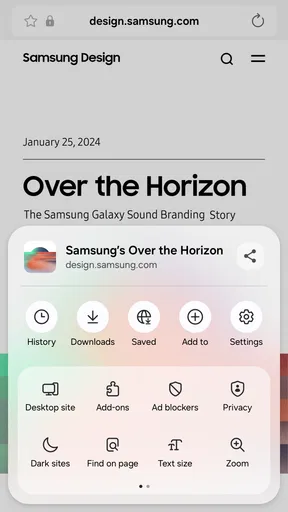
One of the cool things about this browser is its support for extensions. You can add functionality to match your browsing habits. Whether it’s an ad-blocker or a password manager, there’s something for everyone. It’s like having a customizable toolkit at your disposal.
Customization and Personalization
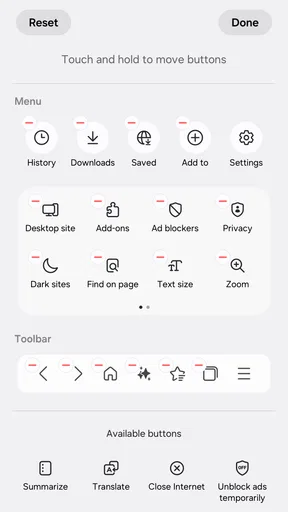
If you’re someone who likes to have things their way, you’ll appreciate the customization options. From changing themes to organizing bookmarks, it allows you to tailor the browser to your liking. It’s like having a wardrobe that you can change up whenever the mood strikes.
Integration with Samsung Ecosystem
If you’re already in the Samsung ecosystem, this browser complements it seamlessly. Syncing bookmarks and tabs across devices is a breeze. It’s like having your own personal cloud, ensuring that you can pick up where you left off, no matter which device you’re using.
Drawbacks: A Few Bumps on the Road
While the browser is pretty solid, it’s not without its hiccups. Some users have reported occasional crashes, although I didn’t experience any during my trial. Additionally, while the extension library is growing, it’s not as extensive as some other browsers out there. But hey, nothing’s perfect, right?
Overall, the Samsung Browser is a surprisingly robust option for Android users, and it’s worth considering if you’re in the market for a new browser. It combines speed, privacy, and customization in a neat little package. So, why not give it a try and see if it fits into your daily online routine?
Pros
- Fast and smooth performance.
- Excellent privacy features.
- Ad blocking capabilities.
- Integrated video assistant.
- Customizable user interface.
Cons
- Limited extension support.
- Occasional website compatibility issues.
- No desktop version available.
- Sync limited to Samsung devices.
- Frequent updates can be intrusive.
FAQs for Samsung Browser
What are the standout features of Samsung Browser?
Samsung Browser offers several standout features, including a built-in ad blocker, a night mode for comfortable reading in low-light conditions, and a customizable toolbar. The browser also supports extensions and add-ons, enhancing user functionality. Additionally, it includes privacy-focused features like a tracking blocker and secret mode for secure browsing.
Is Samsung Browser compatible with non-Samsung devices?
Yes, Samsung Browser is compatible with most Android devices, not just those manufactured by Samsung. This makes it a versatile choice for users who appreciate its features but use other brands. To install it, users can download it directly from the Google Play Store on their Android device.
How does Samsung Browser ensure user privacy and security?
Samsung Browser prioritizes user privacy and security through several measures. It includes a robust tracking blocker to prevent websites from tracking user activity. The secret mode allows browsing without saving history, and the browser also supports HTTPS, ensuring secure communication. Additionally, regular updates keep security features up to date.
Can I sync Samsung Browser with other devices?
Yes, Samsung Browser supports synchronization with other devices. By logging into your Samsung account, you can sync bookmarks, saved pages, and open tabs across multiple devices. This seamless integration is especially useful for users who switch between devices but want to maintain a consistent browsing experience.
Does Samsung Browser support extensions and add-ons?
Samsung Browser does support a variety of extensions and add-ons, enhancing its functionality. Users can add features like password managers, translation tools, and more. While the selection might not be as extensive as some other browsers, the available options cover a wide range of user needs and preferences.


